ESP32 NOW를 진행하기 이전에 아두이노를 설치한다
https://www.arduino.cc/en/software/
https://www.arduino.cc/en/software/
By downloading the software from this page, you agree to the specified terms. The Arduino software is provided to you "as is" and we make no express or implied warranties whatsoever with respect to its functionality, operability, or use, including, without
www.arduino.cc
데스크 탑이여서 윈도우 버전으로 설치하였습니다.
설치가 다되면 추가 보드 관리자 URL에다가 아래와 같은 주소를 붙어넣기를 통해 추가해주시면됩니다.
https://raw.githubusercontent.com/espressif/arduino-esp32/gh-pages/package_esp32_index.json
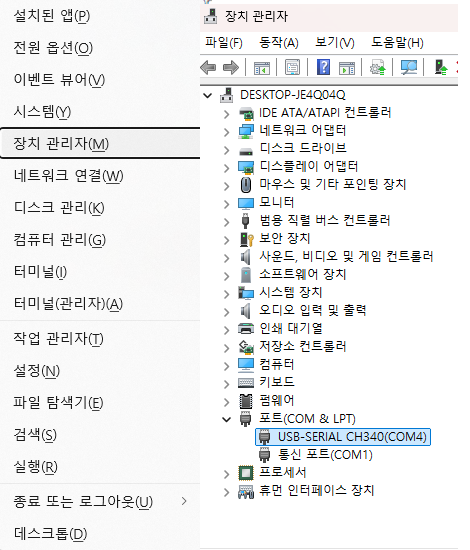
다음에는 본인 PC 에서 윈도우키 + X 를 눌러 장치관리자를 누릅니다.
포트에서 현제 esp32와 연결된 포트를 확인합니다 저는 COM4로 확인이 되고있습니다.
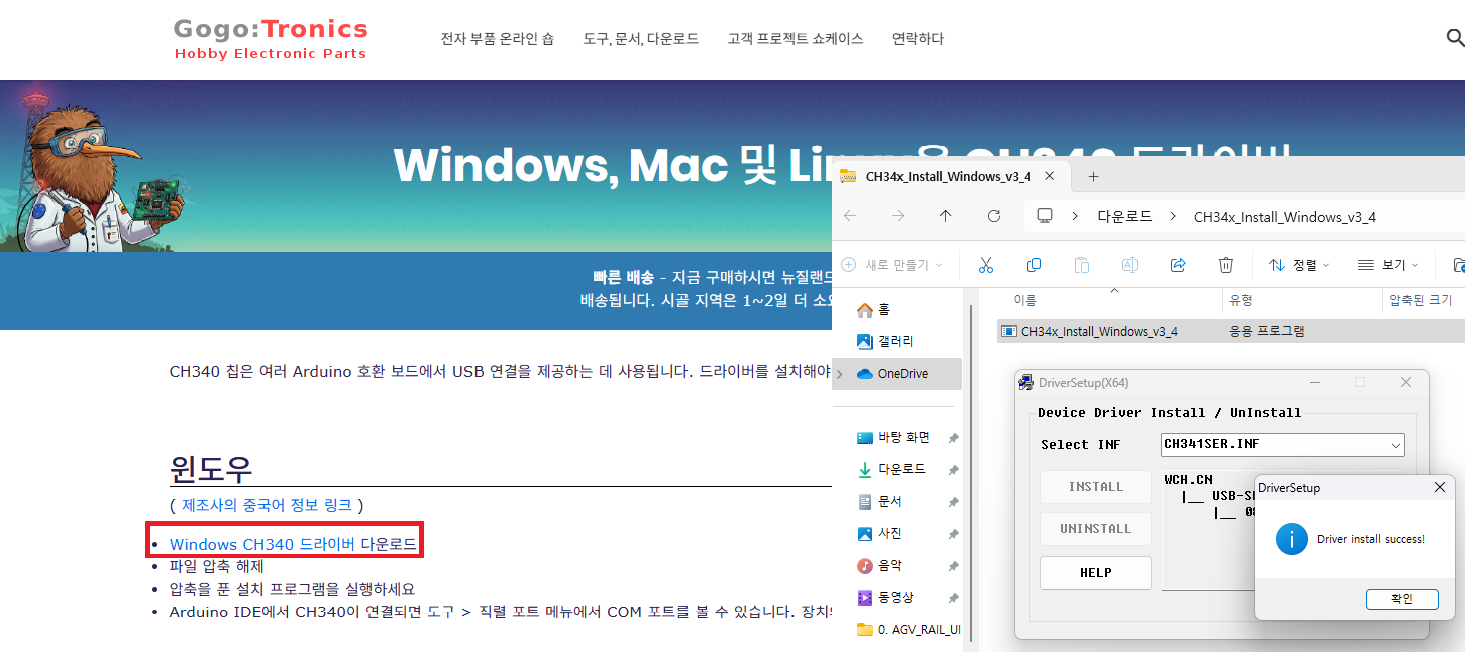
ESP32에 달려있는 CH340드라이버를 설치해주셔야합니다. 보드매니저 추가이전에 설치 를 미리 해놓는게
오류가 안일어나는것 같습니다.
https://sparks.gogo.co.nz/ch340.html?srsltid=AfmBOop_y5OXbVWW9N4KC3mhM9bIBpXQY22XHHkq6EXdtZV-aGyiX3Cn
CH340 Drivers for Windows, Mac and Linux
The CH340 chip is used by a number of Arduino compatible boards to provide USB connectivity, you may need to install a driver, don’t panic, it’s easier than falling off a log, and much less painful. Windows (Manufacturer’s Chinese Info Link) Download
sparks.gogo.co.nz
이제 아두이노에서 보드매니저에서 ESP32 를 설치해야합니다.
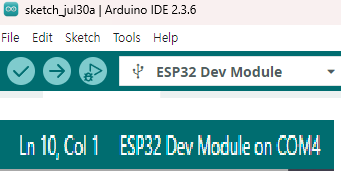
보드매니저 설치가 다되면 보드 ESP32 Dev Module 와 방금 확인한 포트 COM4 로 지정합니다 지정이 맞게 확인하는방법은
업로드 스피드는 115200으로 맞춰주셔야합니다.
아래의 코드는 ESP32의 MAC주소를 확인하기위해 업로드를 진행해주시면 됩니다.
/*
  Rui Santos & Sara Santos - Random Nerd Tutorials
  Complete project details at https://RandomNerdTutorials.com/get-change-esp32-esp8266-mac-address-arduino/
  Permission is hereby granted, free of charge, to any person obtaining a copy of this software and associated documentation files.
  The above copyright notice and this permission notice shall be included in all copies or substantial portions of the Software.
*/
#include <WiFi.h>
#include <esp_wifi.h>

void readMacAddress(){
  uint8_t baseMac[6];
  esp_err_t ret = esp_wifi_get_mac(WIFI_IF_STA, baseMac);
  if (ret == ESP_OK) {
    Serial.printf("%02x:%02x:%02x:%02x:%02x:%02x\n",
                  baseMac[0], baseMac[1], baseMac[2],
                  baseMac[3], baseMac[4], baseMac[5]);
  } else {
    Serial.println("Failed to read MAC address");
  }
}

void setup(){
  Serial.begin(115200);

  WiFi.mode(WIFI_STA);
  WiFi.STA.begin();

  Serial.print("[DEFAULT] ESP32 Board MAC Address: ");
  readMacAddress();
}

void loop(){

}
코드를 업로드한 후 115200의 전송 속도로 직렬 모니터를 열고
ESP32 RST/EN 버튼을 누릅니다. MAC 주소는 다음과 같이 인쇄됩니다.
업로드 이후 ESP32의 EN핀을 누르니 아래와같이 MAC주소가 확인이됩니다.
송신기 역활 ESP-32S MAC주소
[DEFAULT] ESP32 Board MAC Address: 8c:4f:00:d0:bf:80
송신기는 포트 COM5로 진행하였습니다.
#include <esp_now.h>
#include <WiFi.h>
#include "esp_wifi.h"
#define LED_PIN 2 // 내장 LED 또는 외부 LED 핀 번호
// 수신기 MAC 주소
uint8_t broadcastAddress[] = { 0x B0 , 0x A7 , 0x 32 , 0x F3 , 0x B3 , 0x 5C } ;
// 데이터 구조체 정의
typedef struct struct_message {
char a [ 32 ];
int b;
float c;
bool d;
} struct_message;
struct_message myData;
esp_now_peer_info_t peerInfo;
// 전송 결과 콜백
void OnDataSent ( const wifi_tx_info_t * info , esp_now_send_status_t status) {
Serial . print ( "Send Status: " ) ;
if ( status == ESP_NOW_SEND_SUCCESS ) {
Serial . println ( "Success" ) ;
digitalWrite ( LED_PIN, LOW ) ; // 성공 시 LED 꺼짐
} else {
Serial . println ( "Fail" ) ;
digitalWrite ( LED_PIN, HIGH ) ; // 실패 시 LED 켜짐
delay ( 100 ) ;
digitalWrite ( LED_PIN, LOW ) ;
}
}
void setup () {
Serial . begin ( 115200 ) ;
WiFi . mode ( WIFI_STA ) ;
// ✅ Long Range 모드 설정
esp_wifi_set_protocol ( WIFI_IF_STA, WIFI_PROTOCOL_LR ) ;
// ✅ LED 핀 설정
pinMode ( LED_PIN, OUTPUT ) ;
digitalWrite ( LED_PIN, LOW ) ;
// ESP-NOW 초기화
if ( esp_now_init () != ESP_OK ) {
Serial . println ( "ESP-NOW 초기화 실패" ) ;
return ;
}
// 콜백 등록
esp_now_register_send_cb ( OnDataSent ) ;
// 피어 등록
memcpy ( peerInfo . peer_addr , broadcastAddress, 6 ) ;
peerInfo . channel = 0 ;
peerInfo . encrypt = false ;
if ( ! esp_now_is_peer_exist ( broadcastAddress )) {
if ( esp_now_add_peer ( &peerInfo ) != ESP_OK ) {
Serial . println ( "피어 등록 실패" ) ;
return ;
}
}
Serial . println ( "송신기 준비 완료" ) ;
}
void loop () {
// 전송할 데이터 구성
strcpy ( myData . a , "THIS IS A CHAR" ) ;
myData . b = random ( 1 , 20 ) ;
myData . c = 1.2 ;
myData . d = false ;
// 전송 시도
esp_err_t result = esp_now_send ( broadcastAddress, ( uint8_t * ) &myData, sizeof ( myData )) ;
if ( result == ESP_OK ) {
Serial . println ( "Sent with success" ) ;
} else {
Serial . println ( "Error sending the data" ) ;
// ❗ 전송 함수 호출 자체가 실패할 경우도 LED 깜빡이기
digitalWrite ( LED_PIN, HIGH ) ;
delay ( 100 ) ;
digitalWrite ( LED_PIN, LOW ) ;
}
delay ( 2000 ) ;
}
수신기 역활 ESP-32(DEVKITV1)
[DEFAULT] ESP32 Board MAC Address: b0:a7:32:f3:b3:5c수신기 Esp32코드를 업로드 하겠습니다. 수긴기는 포트 COM3로 진행하였습니다.
#include <esp_now.h>
#include <WiFi.h>
#include "esp_wifi.h"
#define LED_PIN 2 // 내장 LED 또는 외부 LED 핀 번호
// 송신기 MAC 주소 (예: 8C:4F:00:D0:BF:80)
uint8_t broadcastAddress[] = { 0x 8C , 0x 4F , 0x 00 , 0x D0 , 0x BF , 0x 80 } ;
// 송수신 데이터 구조체 (공통 정의)
typedef struct struct_message {
char a [ 32 ];
int b;
float c;
bool d;
} struct_message;
struct_message incomingData;
struct_message replyData;
esp_now_peer_info_t peerInfo;
// 수신 콜백 함수
void OnDataRecv ( const esp_now_recv_info_t * info , const uint8_t * data , int len) {
memcpy ( &incomingData, data, sizeof ( incomingData )) ;
Serial . println ( "📩 데이터 수신:" ) ;
Serial . print ( "Char: " ) ; Serial . println ( incomingData . a ) ;
Serial . print ( "Int: " ) ; Serial . println ( incomingData . b ) ;
Serial . print ( "Float: " ) ; Serial . println ( incomingData . c ) ;
Serial . print ( "Bool: " ) ; Serial . println ( incomingData . d ? "true" : "false" ) ;
Serial . println ( "--------------------------------" ) ;
// RSSI 측정 및 LED 경고
int rssi = info -> rx_ctrl -> rssi ;
Serial . print ( "수신 RSSI: " ) ;
Serial . println ( rssi ) ;
if ( rssi < - 75 ) {
Serial . println ( "신호 약함 - LED 깜빡임" ) ;
digitalWrite ( LED_PIN, HIGH ) ;
delay ( 100 ) ;
digitalWrite ( LED_PIN, LOW ) ;
}
// 응답 데이터 구성
strcpy ( replyData . a , "Reply from 수신기" ) ;
replyData . b = incomingData . b + 100 ;
replyData . c = 9.99 ;
replyData . d = true ;
// 송신기에게 응답 전송
esp_err_t result = esp_now_send ( broadcastAddress, ( uint8_t * ) &replyData, sizeof ( replyData )) ;
if ( result == ESP_OK ) {
Serial . println ( "응답 전송 성공!" ) ;
} else {
Serial . println ( "응답 전송 실패!" ) ;
}
}
// 전송 콜백
void OnDataSent ( const wifi_tx_info_t * wifi_info , esp_now_send_status_t status) {
Serial . print ( "응답 전송 상태: " ) ;
Serial . println ( status == ESP_NOW_SEND_SUCCESS ? "Success" : "Fail" ) ;
}
void setup () {
Serial . begin ( 115200 ) ;
WiFi . mode ( WIFI_STA ) ;
// Long Range 모드 활성화
esp_wifi_set_protocol ( WIFI_IF_STA, WIFI_PROTOCOL_LR ) ;
// LED 핀 설정
pinMode ( LED_PIN, OUTPUT ) ;
digitalWrite ( LED_PIN, LOW ) ;
// ESP-NOW 초기화
if ( esp_now_init () != ESP_OK ) {
Serial . println ( " ESP-NOW 초기화 실패" ) ;
return ;
}
// 콜백 등록
esp_now_register_recv_cb ( OnDataRecv ) ;
esp_now_register_send_cb ( OnDataSent ) ;
// 송신기 등록
memcpy ( peerInfo . peer_addr , broadcastAddress, 6 ) ;
peerInfo . channel = 0 ;
peerInfo . encrypt = false ;
if ( ! esp_now_is_peer_exist ( broadcastAddress )) {
if ( esp_now_add_peer ( &peerInfo ) != ESP_OK ) {
Serial . println ( "피어 등록 실패" ) ;
return ;
}
}
Serial . println ( "수신기 준비 완료" ) ;
}
void loop () {
// 수신기는 loop에서 별도 작업 없음
}